
To select the appropriate invoice format for your e-invoice in Bookyt, proceed as follows:
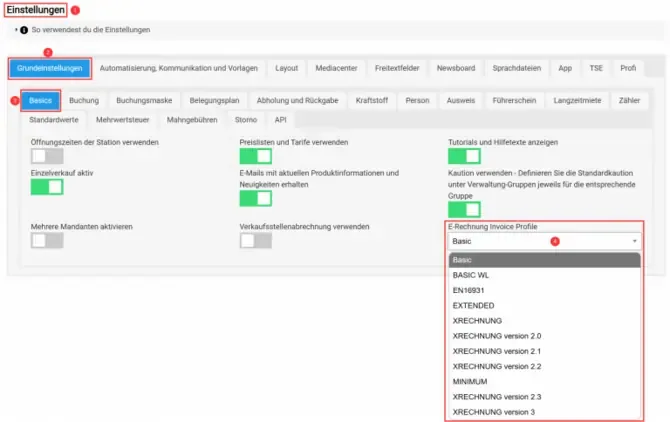
- Go to the Settings of your Bookyt account.
- Select the Basic settings tab.
- Click the Basics tab.
- In the lower-right corner, you will find the dropdown menu with the invoice profiles. We recommend the XRECHNUNG Version 2.3 format.
How to find the client settings
To configure the required client settings, follow these steps:
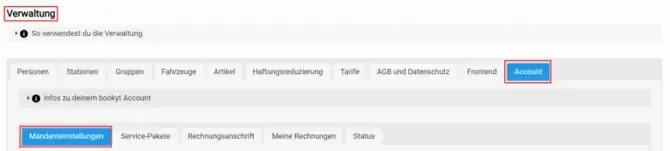
- Open Administration.
- Go to Account.
- Switch to Client settings.
Requirements for properly creating the e-invoice
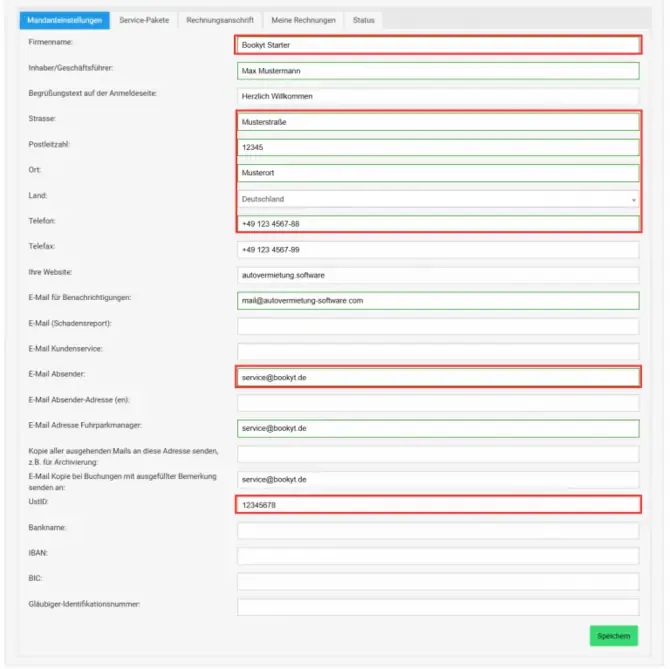
For the e-invoice to be generated correctly, the following information must be stored in your account:
- Full name of the company or organization
- Postal address including: street, postal code, and city
- Country selection
- Email address
- Phone number
- VAT identification number (VAT ID)
Make sure this information is correct and complete so that the e-invoice can be created properly.