The API test journey lets you prepare and test an external integration with Bookyt. The test environment helps you retrieve master data, check availability, create bookings, and test cancellations.
Open the API Test Journey
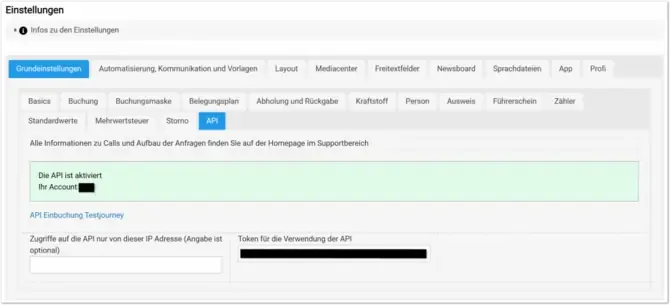
In the Bookyt backend, open the settings and go to “Basic Settings” -> “API”. If the API interface has been booked for your account, this is shown in the green notification.
Then start the test environment via “API Booking Test Journey”.
Retrieve Stations and Categories
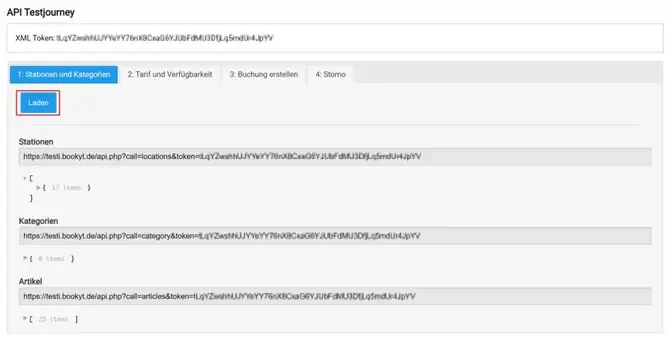
In this section, you can see the XML token that forms the basis for communication between Bookyt and your external solution. Via “Load”, Bookyt retrieves station, category, and item data and generates the corresponding API calls.
Station and category data is retrieved via GET.
Check Rates and Availability
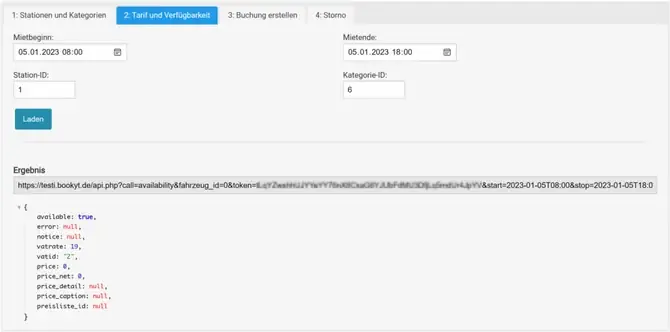
Import rates and availability via “Load”. You can manually adjust the rental start, rental end, station ID, and category ID, then generate another call.
If you do not want to use the Bookyt rate function, you can set preisliste_id = 0 when creating the booking and pass prices directly in the line items.
Rate and availability data is also retrieved via GET.
Create a Booking
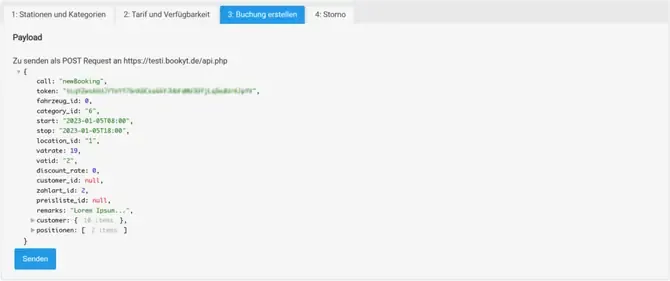
In this step, the payload that is transmitted to Bookyt to create a booking is generated. Via “Send”, the test environment transmits the payload and creates the booking in the system.
The generated QR code is used system-wide. It serves as an online receipt page for the customer and can also be scanned with the Bookyt app to open the booking for pickup and return.
The specific vehicle is assigned by Bookyt in the background when the booking is created. Booking data is sent via POST.
Test Cancellation
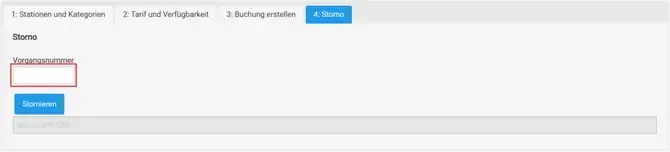
Enter a transaction number and click “Cancel” to cancel the specified transaction. Bookyt generates the stored cancellation documents. In addition, an example call is generated that can be used to cancel a previously created booking.
Cancellation data is sent via POST.